
ENTERPRISE RECRUITMENT & ADMISSIONS ARCHITECTURE

Stop running admissions through shared inboxes and fragmented spreadsheets.

World Ready delivers a compliant, end-to-end recruitment operations engine for universities and colleges. Automate Genuine Student (GS) verification, eliminate partner friction, and settle commissions with audit-ready accuracy—under your brand and domain.

Book an Architecture Walkthrough Explore System Documentation
BUILT FOR INSTITUTIONAL ADMISSIONS & GLOBAL RECRUITMENT hover a term to light it
International Student Recruitment CRM·Genuine Student (GS) Compliance Automation·International Student Recruitment CRM·Genuine Student (GS) Compliance Automation·
Higher Education Admissions Workflow·Sub-Agent Governance·Higher Education Admissions Workflow·Sub-Agent Governance·
Automated Education Agent Commission Clearing·Speed · Compliance · Partner Accountability·Automated Education Agent Commission Clearing·Speed · Compliance · Partner Accountability·

The unified international admissions platform built for speed, compliance, and partner accountability.

Higher education international offices face mounting regulatory scrutiny, fluctuating visa thresholds, and surging applicant document volumes. World Ready replaces siloed legacy tools with an operational pipeline that enforces institutional compliance at lodgement, slashes document assessment cycles, and gives authorized partners real-time visibility from enquiry to census date.

sector pressure · what international offices tell us hover to pause

{{ q.text }}

{{ q.who }}
the intelligence engine

Speed, adoption & delivery.

scroll to step through · screen {{ tabN }} of 3
the challenge

{{ active.challenge }}

the system solution

{{ active.solutionTitle }}

{{ active.solution }}

raw package · 7 files transcript_2023_VN.pdf IELTS_TRF.pdf passport_scan.jpg employment_letter.pdf bank_statement.pdf bulk upload · 00:{{ parseSeconds }}s
→ student record · structured
{{ x.k }}{{ x.v }}
AUDIT-READY · −30 MIN
Application Status Reasons
Edi
I can see you're on Application A882 and asking about status reasons. When an application's status is set — like Declined, Withdrawn, or Deferred — a Status Reason field appears with a picklist of reasons specific to that status. Here's how new reasons get added:
1Ask your App Admin or Organisation Admin to open Admin Center → Process Mapping.
2Select Object Type: Application.
3Pick the relevant Process and Stage.
4Select the Status that needs a new reason.
5Add the reason in the Status Reason column on the right.
• Status reasons are scoped per Process — a reason on one process won't appear on another unless added there too. • If you can't reach your admin, lodge an inquiry through the Help Chat and the team will coordinate.
Can I add a status reason myself? Are status reasons the same across all processes?
Can I add a status reason myself?
Edi
I can see you're on Application A882 and asking about adding a status reason. Status reasons are configured by your organisation's administrators — you can't add them directly from the application. Here's how a new status reason gets added:
1Your App Admin or Organisation Admin opens Admin Center → Process Mapping.
2They pick Object Type: Application.
3They select the relevant Process and Stage.
4They select the Status that needs a new reason.
5They add the reason in the Status Reason column on the right.
• If you can't reach your admin, lodge an inquiry through the Help Chat and our team will coordinate. Note: Status reasons are scoped per Process — a reason on one process won't appear under a different process unless added there too. Existing applications keep their old reason if you remove one from the list.
what is the difference between enrolment and application record.
Edi
I can see you're on Application A882 and want to understand how applications relate to enrolments. They're two different record types that work together — here's the relationship:
1An Enrolment is the parent record that groups all applications for one student at a particular provider.
2An Application is a single course attempt within that enrolment — one student can have multiple applications under the same enrolment.
3The hierarchy is: Student → Enrolment → Application(s). One enrolment can contain multiple applications (e.g., a re-application or a different course at the same provider).
4Enrolment-level fields like Stage and Status are computed from the active enrolment's primary application.
5Use the Enrolment record to see the overall student–provider relationship; use the Application record to check or update a single course attempt.
• A student can have multiple enrolments only across time — at any one point, they have one active enrolment (Status Mode = In Progress). • Each application belongs to exactly one enrolment. When a student applies to the same provider again, the new application is added to the same enrolment.
How do I view all applications under an enrolment? Where do I see commission for a course attempt? Can a student have multiple enrolments?
Can a student have multiple enrolments?
Edi
Yes, a student can have multiple enrolments, but only one at a time. At any given moment, a student has one active enrolment — the one whose Status Mode is 'In Progress'. Once that enrolment reaches a terminal status (Won or Loss), a new enrolment can begin.
• An active enrolment represents one engagement attempt with a student at a provider. Multiple enrolments only happen across time, not simultaneously. • If a student shows 'no active enrolment', they've completed a previous engagement and haven't started a new one yet.
How do I view all enrolments for a student? What does it mean when an enrolment status is Won or Loss? Can I create a new application in an existing enrolment?
Can I create a new application in an existing enrolment?
Edi
I can see you're on Application A882 and asking about creating a new application within an existing enrolment. Yes — you can add multiple applications to the same enrolment. Each application represents a different course attempt at the same provider. Here's how to do it:
1Navigate to Enrolments and open the enrolment record you want to add an application to.
2Select the Applications panel.
3Select Create Application in the panel header.
4Fill in the required fields: Provider (pre-filled from the enrolment), Campus, and Course.
5Select the Student and/or Enrolment to link the application to.
6Save to create the application.
• Campus options are filtered to show only campuses from the selected Provider. • Course options are filtered to show only courses available at the selected Campus. • After creation, the application starts at the first stage (New) if a workflow process is configured for it.
How do I edit an application after it's created? What happens to the application after I create it?
Ask how to do anything…
applicationstatusofficercommission est.
{{ r.name }}{{ r.id }}{{ r.status }}{{ r.officer }}{{ r.fee }}
Partner view · Global Study Link · Hanoi branch — pending items, officer, fee timing and disbursement in one view
all work in one place

Email lives on the record. Every action notifies the agent instantly.

Outlook and Gmail thread onto the application, the student, and the case — with templates, status and case linking in the same screen. When your institution acts, agency partners are notified right away, with no status-chasing email needed.

emails · Outlook & Gmail threaded onto the record
app screenshot — Emails list with status, object & case linking
Every email lands on the application, the student, or the case — with templates and status in the same screen
Notifications
{{ n.av }}{{ n.ref }} {{ n.pre }} {{ n.ref }} {{ n.post }} … See more{{ n.when }} {{ n.ago }}
01 the conversion center & admissions engine

Process applications. Do not just record them.

Admissions workflows require structured progression rather than loose CRM status tags. World Ready enforces consistency across every applicant file.
configured stage progression · scroll to light each gate
01
Pre-ScreeningAgent file received · assignment rules route it to the right officer
02
LodgementCompliance enforced at lodgement · incomplete files cannot progress
03
GS Compliance CheckGenuine Student checklist as a formal, signed-off step
04
Conditional OfferIssued days ahead of competitors · conditions tracked as cases
05
UnconditionalConditions cleared · commission estimate matures toward payable
06
CoE IssuedEnrolment confirmed · yield tracked to census date

{{ c.body }}

applications › A5836 · stage progression · click a stage or watch it advance
gate passed {{ pgFrom }}{{ pgTo }} Status{{ pgPrevStatus }}{{ pgStatus }}
date captured automatically {{ pgDateLabel }} {{ pgDate }} Every progression date is stored on the file — the raw material for stage-duration and conversion analytics.
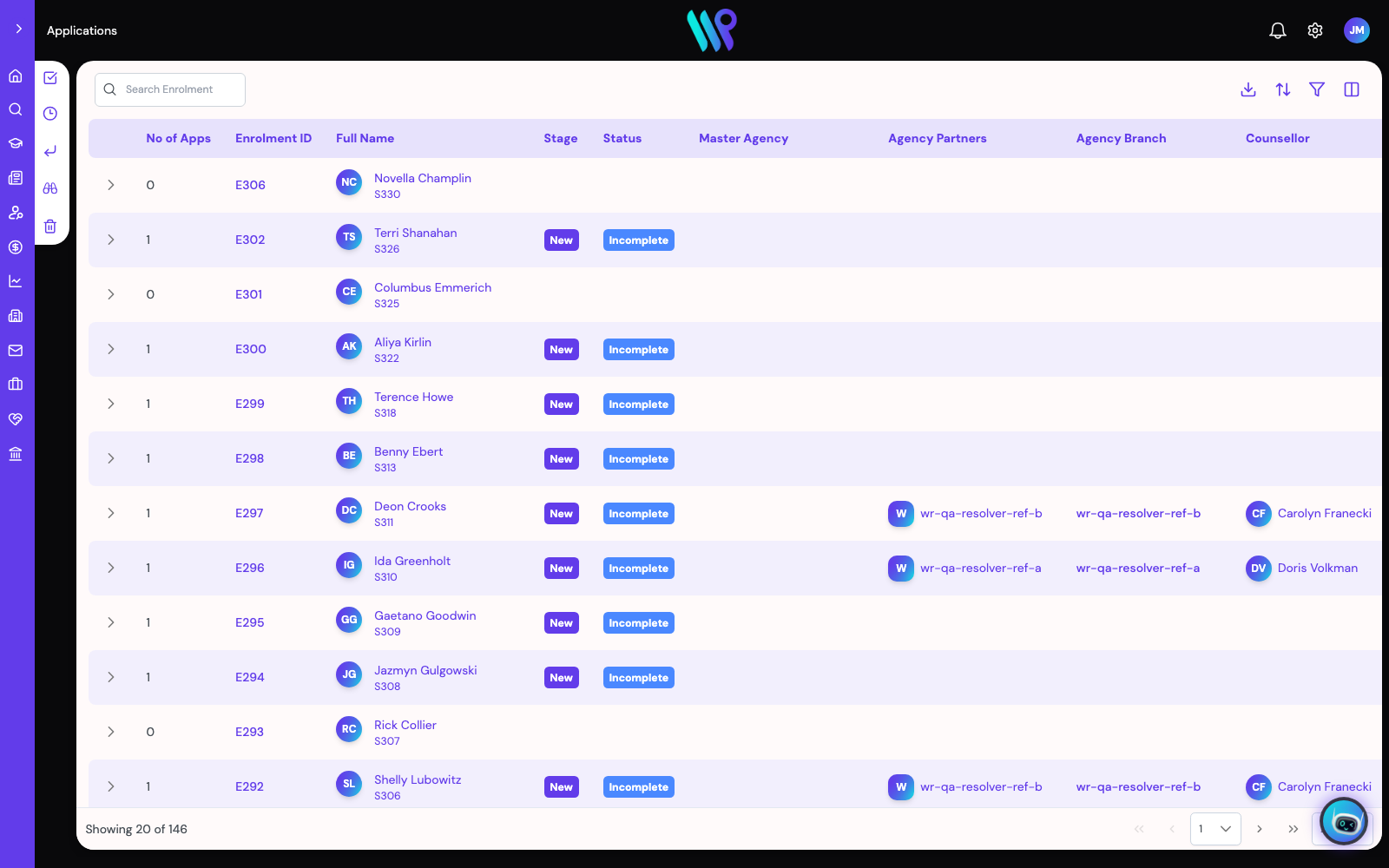
The Applications queue with stage and status per file
02 agency network governance & partner lifecycle

Multi-tier agency network management in a single system.

Manage education partner networks as a structured database rather than a flat contact book.
true hierarchy modeling · hover a tier · each sees only its own desk
MASTER AGENCYsees all tiers below
REGIONAL ENTITYown region only
BRANCH OFFICEown branch only
INDIVIDUAL COUNSELLOR · own desk, documents, earnings

{{ c.body }}

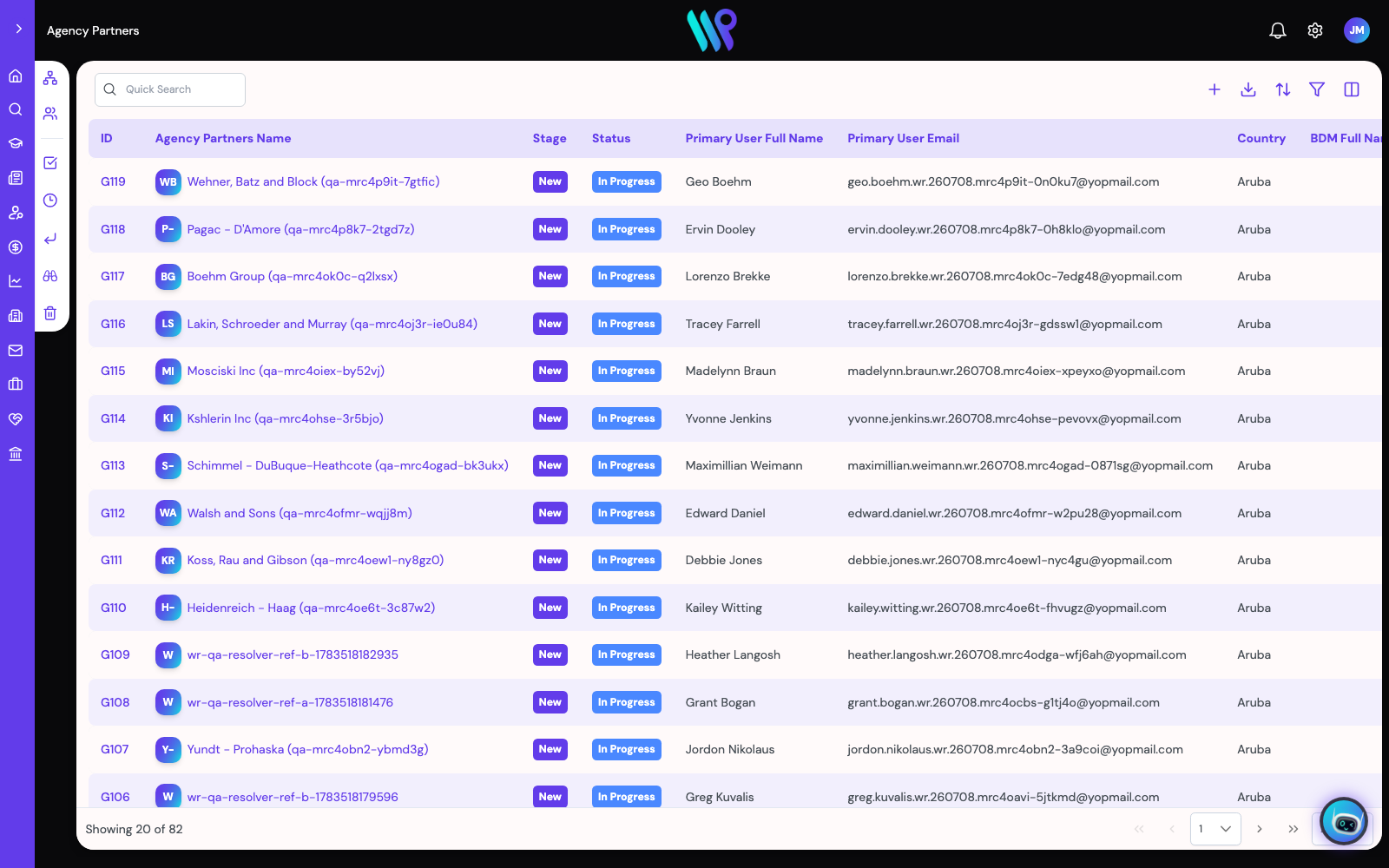
Agency Partners list with stage and status per relationship
03 commission automation & financial reconciliation

Deterministic financial clearing integrated with your general ledger.

Eliminate manual calculations, census date disputes, and spreadsheet-based billing reconciliation.
TransactionsT13836
{{ x.name }}
Transaction
Transaction IDT13836 Commission IDCT2262 App IDA5836 TypeIP Status{{ xStageName }} Net · GST$937.50 · $93.75 Total Amount$1,031.25
xeroInvoice Info
Xero Status{{ xXero }} Sync to XeroYes · 09-Sep-2026 Xero Tran IDAPP-T13836 Outstanding{{ xOutstanding }}
transactionmatching document in xero
{{ d.type }}{{ d.id }}{{ d.pct }}{{ d.party }}{{ d.amt }}{{ d.state }}
{{ d.xtype }}{{ d.xlink }}{{ d.party }}{{ d.xamt }}{{ d.xstatus }}{{ d.xdate }}

{{ c.body }}

Admin CentreCommission Process
Commission ProcessWhen an Institution Partner transaction reaches a status, the Agency Partners and Master Partner bills for the same instalment move to the status you set here.
{{ cmMapped }} of 7 IP statuses mapped{{ cmUnmapped }} statuses will not move partner bills at allShow only unmapped
IP statusagency bills →master bills →Xero wait
{{ r.name }} {{ r.apLabel }} {{ r.mpLabel }}

{{ cmActiveName }} — {{ cmActiveResult }}

This mapping applies to this partner only. A partner with no mapping has no status automation at all — nothing is inherited. Click a row to map or unmap it.
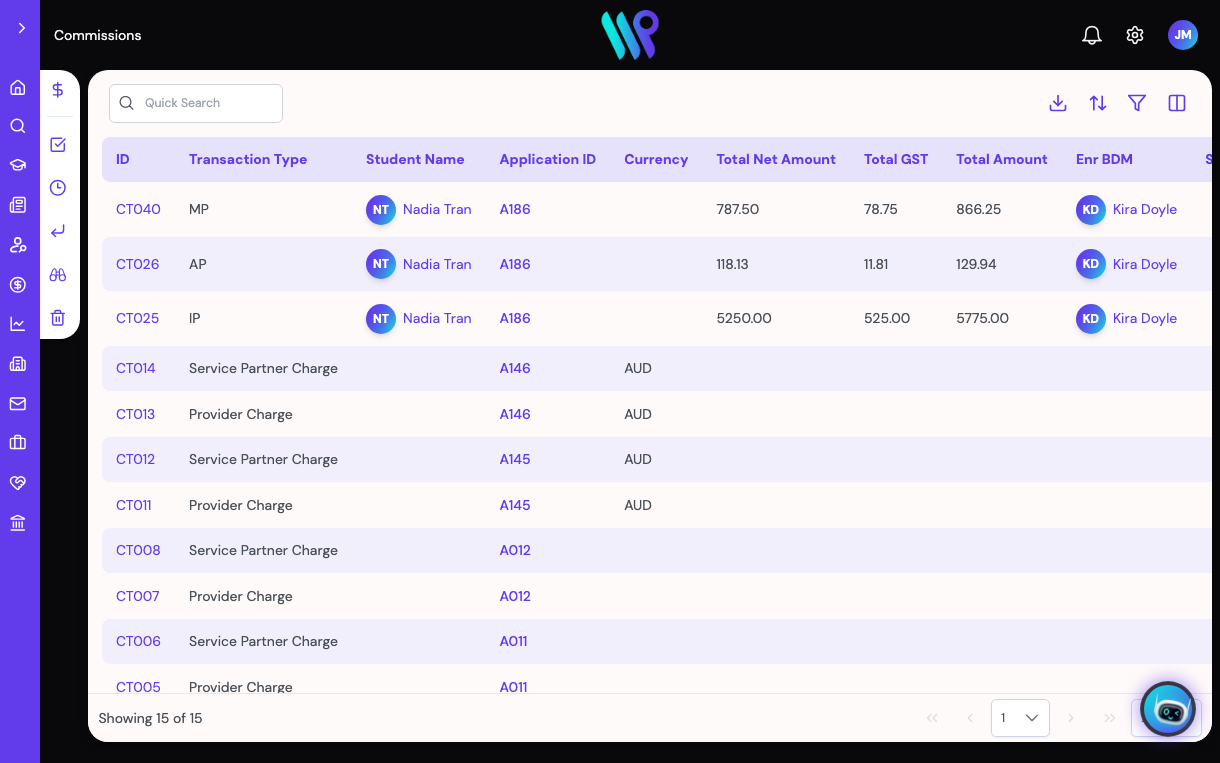
Commissions module with payable status per charge
enterprise delivery & commercials

Live in 1–2 weeks. Not multi-year.

the challenge

Immediate Enterprise Delivery: The Admin Centre

Deploying a new admissions CRM usually means multi-year rollouts and massive consulting invoices.

the system solution

World Ready provisions your site immediately. Every operational lever—from picklists, staged processes, and permission roles to dashboards and automated notifications—is managed by your team directly in the Admin Centre. With a capable operator, your institution can configure the system and be live in 1-2 weeks, completely self-serve.

picklistsstaged processespermission rolesdashboardsautomated notifications

Total White-Label Architecture

Run the entire operations engine under your institution's brand and domain. Logos, colorways, and the portal interface are fully configurable, so your agents sign in directly to your university, not a third-party vendor.

Custom DomainBrand ControlThemed UI

Independent Technology Model

Pricing is published in Australian dollars, from $0. Every tier takes 0% of your commission or tuition revenue.

0%of commission or tuition revenue, on every tier

Global Operations

Registered in Singapore (World Ready Pte Ltd), operating from Australia, with a dedicated team across Australia, Singapore, the Philippines, India, and Nepal.

AustraliaSingaporePhilippinesIndiaNepal

Evaluate audit-ready recruitment operations for your institution.

Bring your existing Genuine Student verification checklist, complex partner tier structure, or commission rules to a live environment demonstration.

Schedule an Institutional Systems Walkthrough

worldready.ai/book/